Showing posts with label linux. Show all posts

2019-09-06

Xfce

Debian buster with Xfce desktop environment
I upgraded my Debian box to the latest version, with the default GNOME desktop environment (DE) recently.  Sometimes the computer runs slowly, perhaps consistent with its age.  On searching the cyberworld, several culprits regarding such slowing are pointed out.  Without going any further, my erstwhile DE is found on top, of course apart from the usual suspects (Microsoft, e.g.).  I thus searched for the best DE, one that is not bloated, one that is lean and mean.  I zeroed in on Xfce which was immediately installed.  Many geeks actually recommend it (among others) for lower-end hardware, although it's also useful for the high end computers.

My relationship with computers spreads for less than 40 years, perhaps occasionally during the first quarter of this period, and probably more frequent later with the introduction of the CD-ROM.  The Internet was not available at all!  I think I used Apple DOS and MS-DOS operating systems (OS).  Internet was available in the second quarter, but it was so slow (using the modem) and also expensive.  In this quarter, it was Windows everywhere I looked.  I think I used Windows 3.0, 95, 98 and ME.

The third quarter showed my frustration with Windows prompting my search for an alternative OS.  The software is buggy, not to mention expensive.  I landed with Linux, particularly the free Debian GNU/Linux 3; it was free alright but I spent time reading about the manual pages.  At this time, Linux was still a geeky subject.  I tried several distributions using disk partitions (called multi-boot install).  In this latter period, I used Windows XP, Vista, 7 and 10; in the UNIX-like OSes I tried NetBSD, GNU Hurd, Fedora, YOPER, Ubuntu, Xubuntu, Lubuntu and of course Debian (present).

Some DE I used include Luna, Aero and Fluent for Windows, and Enlightenment, LXDE, Unity and GNOME, and of course, Xfce.  I'm now back to the traditional scene of the good old menu system, simple and easily configured.  Why fix it when it's not broken?

"Xfce embodies the traditional UNIX philosophy of modularity and re-usability. It consists of a number of components that provide the full functionality one can expect of a modern desktop environment. They are packaged separately and you can pick among the available packages to create the optimal personal working environment."

2019-07-18

Buster

I recently upgraded my Debian system to its latest stable version codenamed buster, or otherwise called Debian GNU/Linux 10.  The process was almost seamless, contrary to what I expected regarding OS upgrades.  I backed-up my files just to be sure (a good practice anyway), but it was unnecessary.  One glitch occurred because I issued the upgrade command from a graphical console window, and the lockscreen program was updated and presumably inserting the default config values.  Later the lockscreen was activated, and typing the password did not work because the display environment was also upgraded.  To fix the broken upgrade, I was forced to reboot and going into safe or command-line mode.  I then issued dpkg --configure -a to try to fix some configuration problems, and also: apt --fix-broken install.  For the next full-upgrade, go the safe text mode route!

One way to make this process easy is by making a small edit at the /etc/apt/sources.list file.  Instead of putting the codename in the entry (like stretch), use its status name, e.g., stable.  One line in that file shows:

deb http://ftp.us.debian.org/debian/ stretch main contrib non-free

Edit that to:

deb http://ftp.us.debian.org/debian/ stable main contrib non-free

buster
Debian GNU/Linux 10 (buster)
Now you don't have to worry, even if you actually forget which is the latest version of Debian.  The system gets continuous updates just like that.

Now I have a nice working Debian on buster, its latest version, with the accompanying changes in the look and feel of the various programs.  Some updated apps however override the existing config files, and you'll be surprised sometimes.

Way to go Debian team!  Thank you for this brand new working version.  Go Buster!

"No one puts new wine into old wineskins; if he does, the new wine will burst the skins and it will be spilled, and the skins will be destroyed.  But new wine must be put into fresh wineskins.  And no one after drinking old wine desires new; for he says, 'The old is good.'" (Luke 5:37ff RSV)

2018-07-27

Python With Kivy in Debian

A lot of concepts there...  Why python?  Because it's so simple a computer language that it's usually a first language for learning programming.  Yet, it's so developed and complete as I see it.  Kivy?  Well, it's a python library used in developing mobile apps and other multitouch application software with a natural user interface (NUI); it can run on Android, iOS, Linux, OS X, and Windows, and it's free and open source.* Debian is there because it's the OS I'm using, and I'm learning some tricks while installing Kivy in it.  The insight why I chose Debian is covered in a previous post.

Installing python is simple and straightforward, but you have to choose python3 because python (as python2) is already installed.  This is not a problem in other OS's where python is not installed by default, and installing python will install the latest available version (python 3.x).  Installing kivy may be straightforward in other OS's, but it demands some patience in Debian as I experienced.  This is due to the many dependencies which usually conflict with the more updated versions of others.  The latest version of Cython, e.g., is not compatible with kivy (cython 0.28.4) so I had to force install the 0.28.2 version.

python powered
Installing kivy should be very easy and as simple as issuing the command 'sudo apt install python3-kivy' and giving your password.  The dependencies are automatically installed, but when you import kivy, errors glare at you, saying some services are not present or some files are missing.  So I decided to use pip (python package installer), issuing the command 'sudo apt install python3-pip', but using pip directly does not work!  The command 'sudo pip install kivy' fails (pip3 may be used because I'm using python3).  I searched the web and I found out that I had to install some packages that are not automatically installed, namely python3-dev, libsdl2-image-dev, libsdl2-mixer-dev, libsdl2-ttf-dev, python3-virtualenv and libgstreamer1.0-dev.  So I uninstalled kivy to avoid conflicts, and installed all those files.  Kivy still doesn't work as above so I used another trick so that python itself will do the installing.  I guess the package will just work for myself (because I didn't use sudo).  I issued the commands:

python3 -m pip install -I Cython==0.28.2  #install a particular version
python3 -m pip install kivy

Now my python works fine with kivy, but I only tested it with my scripts.  Now instead of searching the web for some apps (maybe for some calculations) that are specific to a problem, I make the programs.  Isn't that cool?  When I decide to deploy some apps (for Android and other platforms), I bet I'll have some problems but I'm sure the web is there to help, as before.

2018-03-11

Debian

debian
More than 3 months ago, I posted about my Fedora installation in my desktop computer, and it's smooth sailing since then.  It replaced my erstwhile perfectly running Ubuntu box for 12 years already, just out of curiosity.  OK, admittedly I tried Fedora because I read somewhere that Linus Torvalds, the creator of Linux is using the OS personally.  He also mentioned that he doesn't like Debian because it was difficult to install with its many options, or something to that effect.  Well, it was this last statement that got me thinking into going back to my very first open-source OS... what else... Debian GNU/Linux (now just called Debian)!  That was Debian 3.0 (Woody), way back in 2002.

Four years later (2006), I wrote something on how I got and installed Ubuntu 6.06 on my desktop.  It was so easy because they provided free live CDs!  It was no surprise that Ubuntu is based on Debian, and the former just made it easier to use the latter.

Debian 9 screenshot
Debian 9 overview screenshot
It's good to always return to our roots.  So, I'm back (for good) in debian... it's now Debian 9 (Stretch) using kernel 4.9.0-4-amd64.  The screenshot looks familiar because it also uses GNOME (3.22.2) desktop environment by default.  The user experience is great!

When I got this computer several years ago, it had Windows already installed so I had to install Linux in another partition.  Using the same hardware, linux loads several times faster, and appears more secure and stable.  I don't know if it's the usual, but I don't have any antivirus program running, and nothing seems to matter.  With its more than 21,000 source packages [51k in 2018], the available Debian software can meet almost any need that one could have, whether at home or in the enterprise.  Debian is and will remain composed entirely and exclusively of free software.  All software development within the Debian project, itself, will be free [taken from The Debian Administrator's Handbook].

"Live as free men, yet without using your freedom as a pretext for evil; but live as servants of God." (1 Peter 2.16 RSV)

2017-12-23

Fedora 27

Fedora 27 overview screenshot
I installed Fedora 27 Workstation edition in my desktop computer last December 1, and it's still running without any glitches for a few weeks now.  It has gone through several updates and it's presently using the 4.14.7 kernel version.  I tried this Linux distribution, replacing my Ubuntu box just from curiosity.  Ubuntu is running perfectly though and it's a very good Linux distribution, if one may inquire.

I noticed immediately that Fedora updates opaquely (somewhat like Windows), as opposed to Ubuntu where updates are installed and presented in a separate window.  In Fedora, the computer has to restart or shutdown first before updates are applied.  This is okay with me but others may not be (I guess this behavior can be tweaked).  It uses GNOME (version 3.26.2) as default environment, same as in Ubuntu.

"The truth will make you free."
~Jesus (John 8.32 RSV)

2012-02-18

Installing Ubuntu Via Internet

Installing or adding an operating system on a computer is very easy, as long as you have a working CD/DVD drive or bootable USB device, and the OS (in a CD/DVD or USB stick). What if you have a broken CD drive, non-bootable USB device, or perhaps a very old computer? One alternative is to install the OS (Ubuntu in this case) via the Internet. This is easy as long as the two computers (working PC = PC1, and the computer for installation = PC2) are in the same subnetwork (subnet). In this article, PC1 is a working desktop PC (dual boot with Windows XP and Ubuntu), while PC2 is a vintage Compaq Presario M2000 laptop with a problematic XP installation (pesky Windows behavior).

Ubuntu 11.10 desktop
In Ubuntu (or a similar Debian distribution), one can read its Netboot install page. On my part, I used the Windows version because many use it, and I have a Windows partition anyway just to put it into good use. This article is based from a work in Liberiangeek.net which came out after googling the topic. Because it was based on Ubuntu 10.04, I modified some things for this purpose. So someone who reads this material in the future must modify it because Ubuntu is a dynamic project—2 upgrades per year.

One indication that the 2 PCs are in the same subnet is that the Internet cable (connected to WiFi) is forked and wired in the router (although I guess the wireless devices are likewise in the same subnet). It's hard to explain here but one may go to the Subnetwork topic in Wikipedia to learn about subnets, and also to determine if the 2 computers you're using are in the same subnet.

Procedure


Create an Install folder (or any name you prefer) in the root directory, or at C:\. You should now have a folder C:\Install\. Download tftpd32 standard edition (installer) from tftpd32.jounin.net, and install it. In the installation options, choose Installation and Start as the type of install, and check all the checkboxes. Choose C:\Install\ as the installation directory before clicking Install.

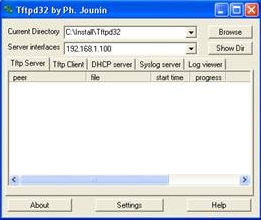
Tftpd32 contents
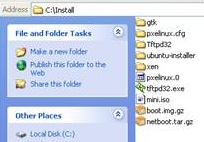
Install contents
To fetch the needed files, it's convenient to use an FTP program and input archive.ubuntu.com as host. For me, I just went directly to the appropriate folder and downloaded the files to C:\Install\. When I did this installation, Oneiric was the latest stable release, so I entered /ubuntu/dists/oneiric/ main/installer-i386/ 20101020ubuntu72/images/ netboot/. This url will be obviously different in the future (even by a few days ahead). The article I was referencing mentioned that I only download pxelinux.0, pxelinux.cfg\ and ubuntu-installer\, but I downloaded all files and folders there.

Open C:\Install\Tftpd32\ and copy tftpd32.exe into C:\Install\. See image for the contents of the two folders (pxelinux.cfg\, Tftpd32\, ubuntu-installer\, pxelinux.0, and tftpd32.exe are required in C:\Install\).

Tftpd32
DHCP Settings
If it's not running, open C:\Install\tftpd32.exe. Click the Settings button below and select the DHCP tab. Configure the network settings (see figure). I noticed that the server interfaces are automatically set so they vary in different PCs. The tricky part here is that you input the appropriate numbers based on the Server interfaces. Determine which fields you increment and which you preserve. Then click OK.

The moment of truth: power on PC2 and don't forget to tap F10 before booting the system. This enters the PhoenixBIOS Setup Utility in my machine. In the Advanced menu, enter Boot-order and modify it to put Network Adaptor on top. Then input F10 to save and exit the setup. It will then boot via the network PXE. Follow the boot instructions, and in a few hours you'll have a working Ubuntu system. When the time comes for you to reboot the new OS, enter the BIOS utility again just to put things in order, meaning the boot from hard disk option must be on top. Save the settings and boot from the hard disk.

Because it's a fresh install, do the initial housekeeping so as to enjoy Ubuntu's full potential.

“One of the sayings in our country is Ubuntu — the essence of being human. Ubuntu speaks particularly about the fact that you can't exist as a human being in isolation. It speaks about our interconnectedness. You can't be human all by yourself, and when you have this quality — Ubuntu — you are known for your generosity. We think of ourselves far too frequently as just individuals, separated from one another, whereas you are connected and what you do affects the whole World. When you do well, it spreads out; it is for the whole of humanity.” (Archbishop Desmond Tutu)

2006-11-15

Decriminalizing Libel

In a free world or democracy, it's been mentioned that the Media is the fourth estate. We need a free media in order to know the truth and also to guard our rights as people. We need courageous reporters and journalists to seek for this truth. But these people are not angels or other superior beings; they often make mistakes, and worse if these mistakes were deliberate. They can report on things that are not true at all! They can destroy the reputation of people, which can never be put back after a later apology. So what do people resort to? Only by filing criminal charges against the said writer or journalist. I don't agree with their arguments that such filing of charges are persecutorial or represent some kind of harrassment! This I think is just and reasonable.

I'm very much disappointed by the move of some sectors in trying to decriminalize libel. They should think again. If libel is not a crime, then these rouge writers will have all the fun, without the responsibility. Journalists (not all) are clamoring for this to happen; what are they up to? If the "victims" are not given an opportunity in court to seek justice, then I'm afraid that they will put things into their hands (a number of journalists and columnists were already murdered perhaps because they stepped on some powerful people's feet). I'm afraid that there will be more of these incidents! No... libel should remain a crime. It's actually a crime against justice and charity.


Use Open-source Software (11/11/06)

While trying to find the weather report on INQ7.net, I happen to click its Technology (Infotech) section, and Mr. Erwin Oliva's article Congress sets public discussion on open source legislation (last updated 10:51pm 11/10/2006) emerged. I perfectly agree that the use of free and open source software (FOSS) should be legislated for the good of the country for several reasons—the most tangible is the savings that will surely ensue.

This open-source movement was started in the 1980s, and was boosted in the 1990s with the introduction of the Linux kernel by Linus Torvalds in Finland, based on the UNIX platform. This movement began tentatively through the collaboration of several unnamed people, and it's now blossoming everywhere. Initially, only techies used it, but now even the uninitiated can use it. (There are several open-source platforms out there, but the most popular is Linux.)

Presently, several Linux platforms are available for use (e.g., try Ubuntu if you really want to get your hands dirty). Pinoy computer experts may someday even develop our very own operating system, especially with our hundreds of languages. Being tied to proprietary software, especially Microsoft is so frustrating. You can't do anything without having to buy their expensive products. So what do people resort to? They purchase pirated ones (MS is becoming more choking by preventing use of their software by such means). Note: I'm not promoting the use of pirated software; I'm just showing the way towards open software.

Not only do we become liberated from such monopolistic companies (freeing our pockets), but actually use genuine open software without restrictions, which are more flexible and uplifting to the mind. Ordinary people can learn to make their own software because many development features are incorporated with the package. If you try Ubuntu (e.g.) as I did, not only will you have the operating system, but also have built-in software including the now famous OpenOffice.org software (free counterpart of MS Office). Why use Windows when you can have the same functionality sans expense?

Kudos to Congressman Teodoro Casiño of Bayan Muna party who authored the bill; I often don't agree with his ideology, but this time I very much agree with him. I hope he'll work very hard to really pass this bill (House Bill number 5769).


Ubuntu Linux (10/28/06)

My very first encounter with computers was with the Apple II and the only way to use it was to know BASIC (PCs were called microcomputers then). That was way back in 1982. Later Microsoft was used specifically with DOS. I don't recall the exact dates but later I used MS Windows. All of these were machines used in the institutions I studied and worked in. The very first computer in the house was bought by my brother and it had Win95 and later Win98 installed. We occasionally installed some other versions (Me and 2000) but it always gravitated to Win98. Only recently was WinXP used.

In late 2002, I decided to try Debian GNU/Linux (kernel 2.2.20) mainly because Windows was very expensive, and also because Linux was nice and free. You only pay for the plastic (CD) and delivery. At that time, I had a hard time and I didn't even recommend it to others. You have to read a lot of documentation, but the more important side-effect was that I appreciated the inner workings of a computer. It also demanded that I use text mode more often (console) than GUIs. After a year or so, I backslid to using Windows again although my PC was dual-boot (can be booted with Windows or Linux). With some emails I received from a classmate of mine (UPCM '91), I decided to again dabble in Linux.

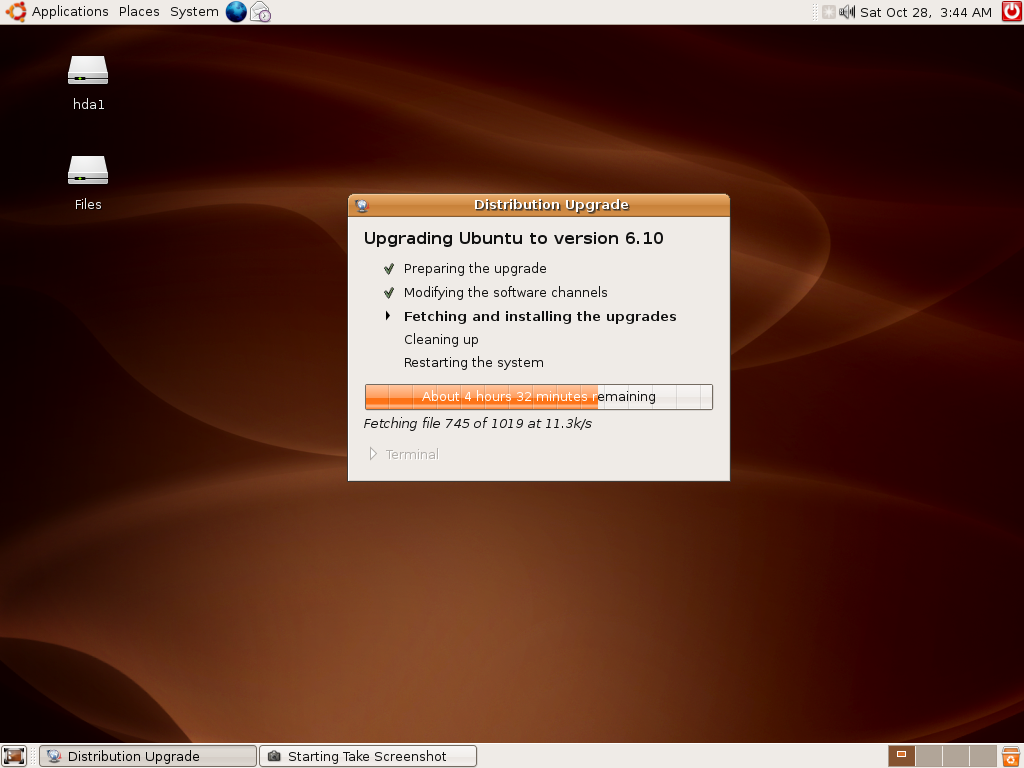
Using Google, I searched: "best linux distribution". The results were unequivocal. Ubuntu always popped up. So I went to its website and ordered Live CDs, and I was surprised that they were given for free, including the stamps! I then installed Ubuntu 6.06 (dual boot with WinXP), nicknamed Dapper Drake. A screenshot of its desktop is included here. It worked perfectly well: everything you can do with Windows, you can do in Ubuntu Linux. And everything is so easy. The picture below was taken while actually upgrading to the newer 6.10 version (called Edgy Elf). Everything was done while on-line, no need to buy a new CD!


After fetching all the needed files for the upgrade overnight (my broadband WiFi is very unreliable and erratic), a new version suddenly popped up (see screenshot below). It's now brighter and the sounds are much better. Everything was very nice. By the way, the desktop was GNOME, which some say looks like a Mac (I don't know if this is true because I never owned a Mac).


I never liked orange before but this kind of theme looks nice now. And maybe after 6 months, a new version will be available and I'll do the same routine as this one. Try Ubuntu; if you have only 1 PC, do a dual boot (disc has to be partitioned or sliced if only 1 HD is present). But I have to warn you that you have to read a lot. More on this later.